I use Claude Code a lot in my day-to-day workflow, so that is usually my default when I want help with engineering tasks.
But recently I wanted to try GPT-5.4 in Codex on something practical instead of judging it from small examples.
I had tried Codex a while ago, and honestly my experience with it back then was not good. It often did not produce the right results for me, so I did not come into this project with blind optimism. That is part of why this test felt useful: I wanted to see whether the current model was actually better in practice.
So I used it on a personal project: a private iOS grocery app called ShopTogether.
What made this project more interesting for me is that I was completely new to iOS development.
So this was not only about trying another model. It was also about seeing whether I could go from zero iOS background to a working app, keep refining it through multiple changes, and get it running on my own phone.
Model Effort
- Codex with the GPT-5.4 high model for the plan
- Codex with the GPT-5.4 medium model for the app work
One small thing I noticed is that even after working through this project, I still had around 40% of my daily Codex usage left. So for this kind of personal app project, the usage felt quite reasonable.
Why I tried GPT-5.4
I was not trying to do a benchmark.
I just wanted to see how GPT-5.4 feels on a normal development workflow where the task is not fixed from the beginning.
This project included:
- product decisions
- SwiftUI UI work
- JSON persistence
- repeated UX changes
- bug fixes
- several rounds of refinement
That made it a better test than asking for one code snippet.
What felt different about GPT-5.4
I do not want to overcomplicate this part.
The useful differences for me were simple:
- it handled multi-step work well
- it stayed useful while requirements changed
- it was comfortable working across UI, logic, and project structure
- it needed less back-and-forth than I expected
One thing I noticed clearly is that I made a lot of iterations with GPT-5.4.
With older GPT-4-style coding workflows, I often felt that after around five iterations, the output would start becoming less useful or the flow would slow down. With GPT-5.4, this project handled more rounds of change much better.
OpenAI also highlights a few practical improvements in GPT-5.4, including stronger long-running agent workflows, better tool/computer use, larger context support in Codex, and better token efficiency than GPT-5.2. Those are the main reasons I thought it was worth trying. OpenAI source
Why this project was a good fit
I did not want to test a model on toy code.
I wanted to see how it behaves when the task includes:
- product thinking
- UI iteration
- persistent state
- bug fixing
- changing requirements during implementation
This grocery app was a good fit for that.
The app needed to support a real household use case:
- a private grocery list for me and my wife
- store-specific sections such as Albert Heijn, Indian Store, and Household
- reusable regular grocery items
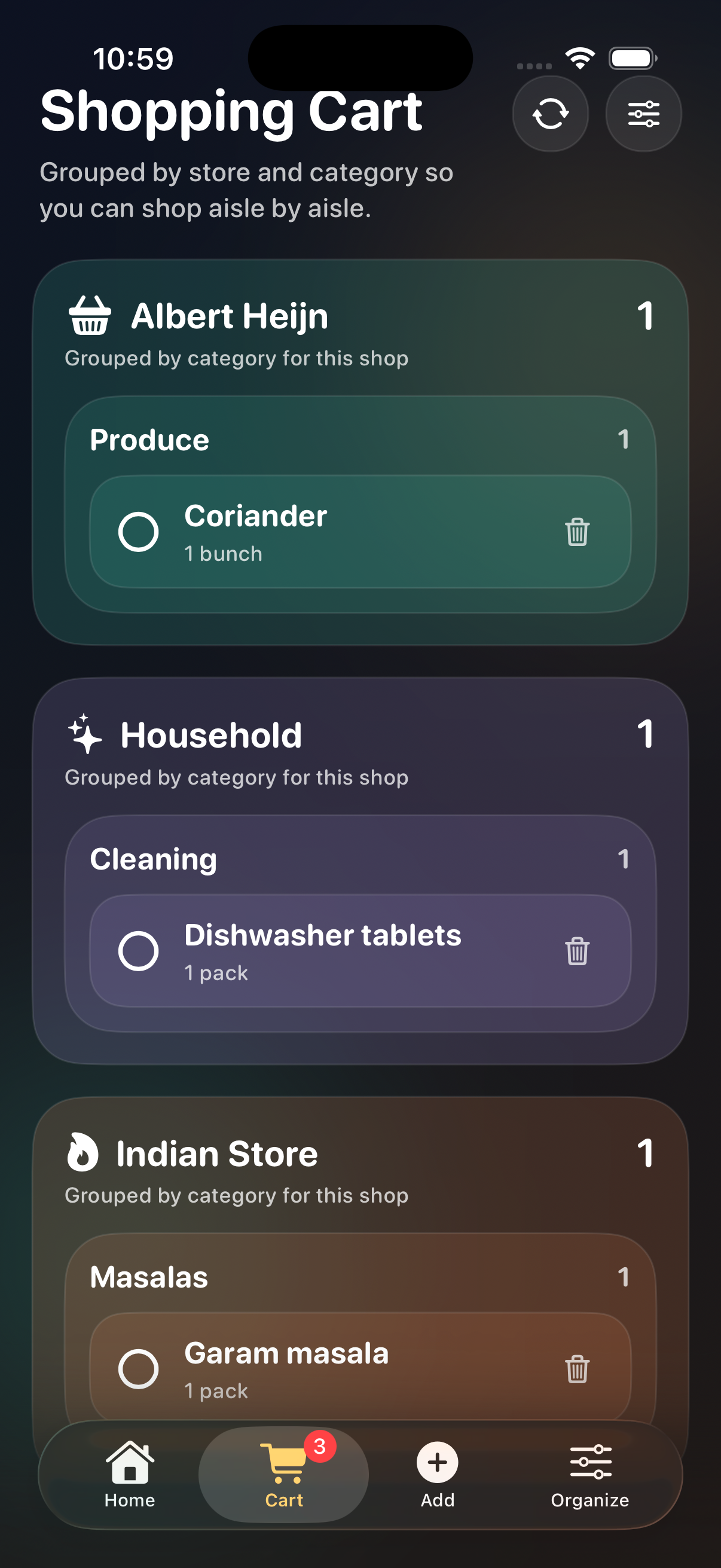
- a cart flow that works while shopping
- shared JSON-based persistence
That gave the project enough depth to be meaningful, while still being small enough to iterate on quickly.
I was completely new to iOS
This was the part that mattered most to me.
I was not coming into this project as an experienced iOS engineer. I was learning while building.
Normally that creates a lot of friction:
- understanding the project structure
- figuring out SwiftUI conventions
- handling Xcode project setup
- dealing with signing and local device installation
- making UI changes without breaking the app
What I liked about this workflow was that I could keep moving without getting blocked at every step.
The model was not just useful for writing code. It was useful for keeping momentum while I was still learning the platform.
The project: ShopTogether
The project itself is a small private SwiftUI iPhone app called ShopTogether.
Before this app, we were mostly sending grocery items back and forth in iMessage.
That worked just enough to be annoying: items got scattered across messages, the list was harder to use while shopping, and it was still easy to miss something at the store.
I am an expat living in the Netherlands, and my grocery shopping is split across different stores.
For example:
- Albert Heijn for regular groceries
- Indian Store for dal, masalas, and Indian vegetables
- Household for cleaning and home items
A single flat list does not work well for that. If I open the app while I am in one specific store, I want to see only the items relevant to that shop.
That led to a store-first structure.
The main app idea
The core workflow is straightforward:
- keep a catalog of usual items
- group them by store and category
- tap items to add them to the cart
- open the cart while shopping
- mark items complete while buying them
That makes the app fast to use in practice.
Instead of typing everything repeatedly, I can just tap the items we buy often.
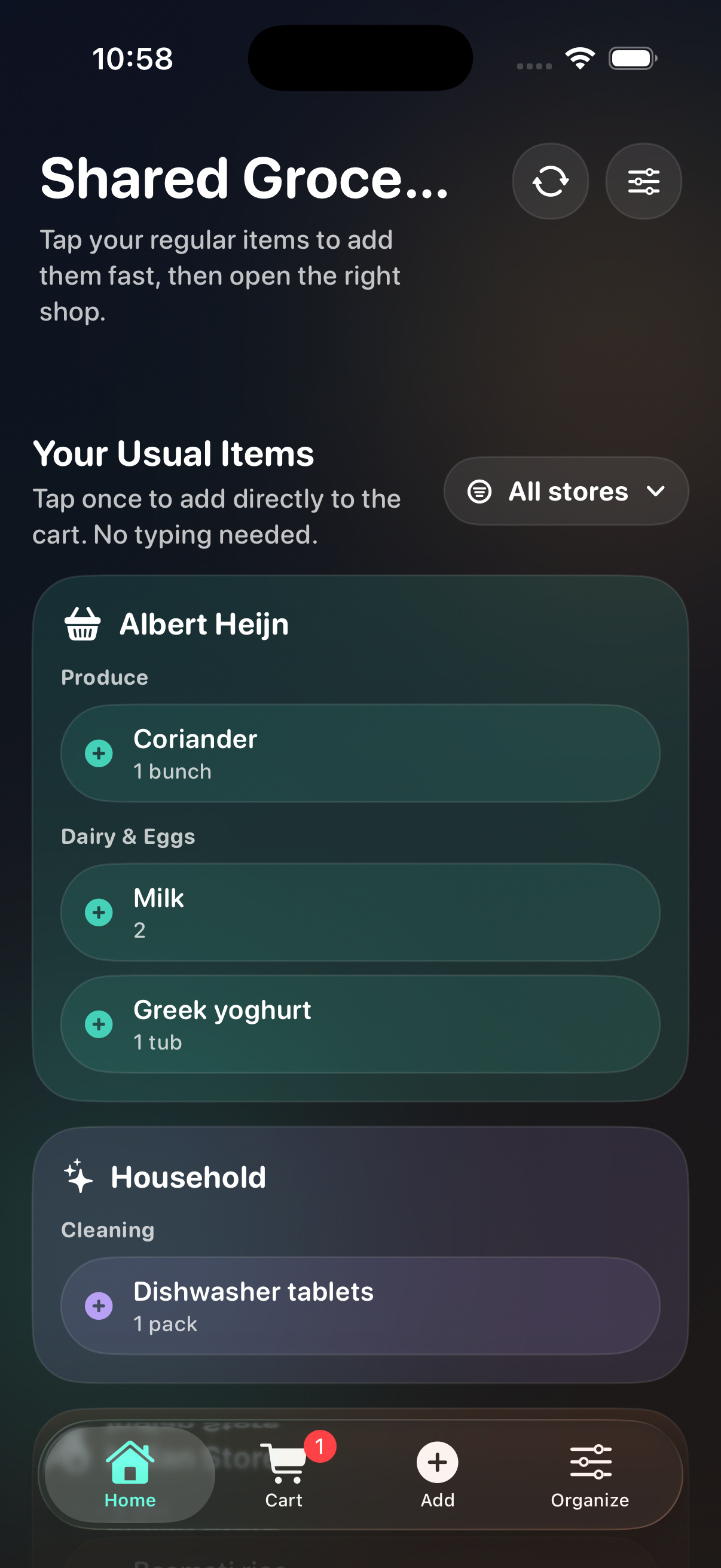
The home screen is where that store-first flow becomes obvious right away.
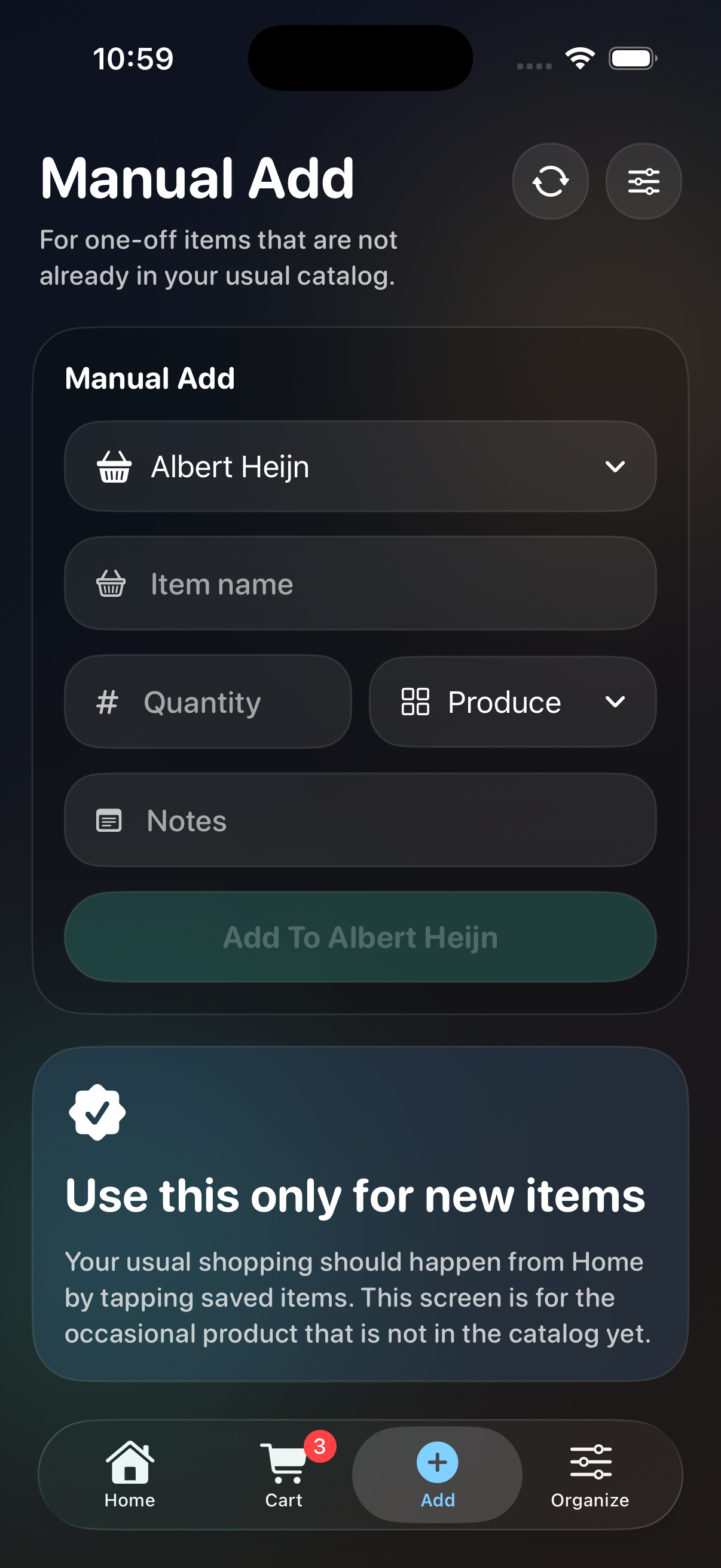
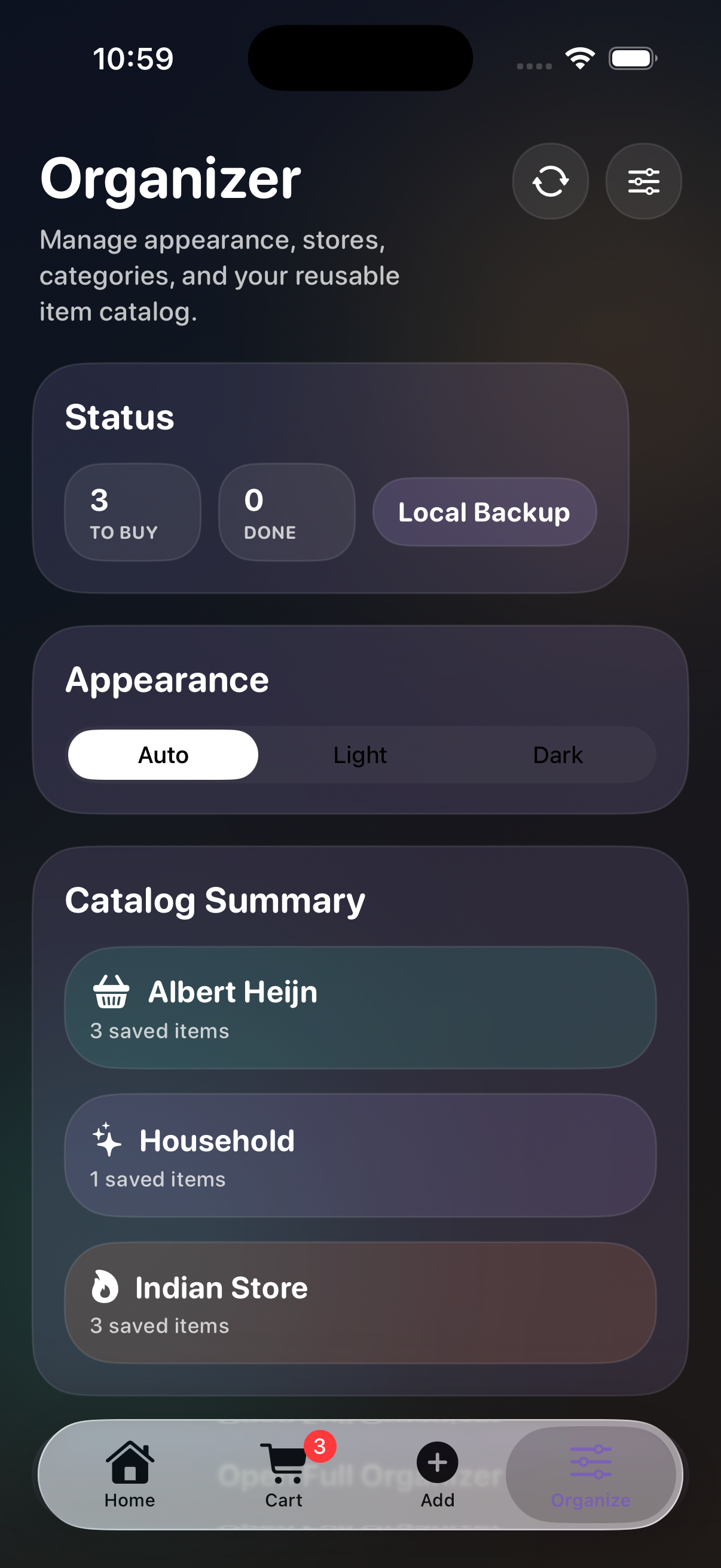
Screenshots
How I interacted with it during the build
One thing I liked in this project is that I barely typed.
I used Wispr for voice input during a lot of the iteration, and that worked really well for this kind of workflow. It made it easy to describe UI changes, product decisions, and follow-up refinements quickly without stopping to type everything manually.
The part I do not like is that Wispr processes in the cloud instead of locally. For this kind of development workflow, I would prefer local processing support. The interaction quality was good, but that cloud dependency is still a downside for me.
To be fair, Wispr does emphasize its security posture. Their public docs mention SOC 2 Type II and HIPAA support/compliance workflows
What GPT-5.4 helped with during the build
The app changed a lot while it was being built.
For example:
- the app scaffold was created first
- persistence was added using a shared JSON file
- store-specific grocery organization was introduced
- the home screen flow was simplified
- the tab navigation was reworked to use native
TabView - the cart tab was updated to show a badge count
- catalog management was extended so saved items and categories could be removed
- a partner-active warning was added so the app can show when the other person is currently using it
What stood out to me was not that everything was perfect on the first try. It was that I could keep making changes continuously without losing momentum.
That matters a lot when you are new to a platform.
Built with SwiftUI
The app itself is intentionally simple in terms of stack:
- SwiftUI for the UI
- local JSON persistence
- iCloud file-based syncing as the preferred shared storage path
- local fallback storage when iCloud is unavailable
That was the right tradeoff for a private app used by two people.
There was no need for a backend, a database, or an account system just to maintain a household grocery list.
Store-first shopping flow
One of the most important design decisions was making the app store-first.
Each store can contain its own categories and regular items.
For example:
- Albert Heijn
- Produce
- Dairy & Eggs
- Pantry
- Indian Store
- Dal
- Masalas
- Snacks
- Household
- Cleaning
- Toiletries
This makes the app much more practical because the list reflects how I actually shop.
Fast add-to-cart behavior
The most useful app behavior is the usual items catalog.
Instead of entering groceries manually every time, I can tap regular items such as:
- Milk
- Greek yoghurt
- Coriander
- Toor dal
- Garam masala
- Dishwasher tablets
That keeps the app fast.
Presence warning for shared usage
Because this app is shared between two people through a single JSON file, I also wanted a simple way to know when the other person was actively using it.
So I added a lightweight partner-active warning on top of the shared state. It is not a hard lock. It is just a simple presence signal that says the other person is active right now and that changes are still being shared.
What I like about this is that it fits the app well:
- it stays simple
- it avoids a heavy backend design
- it gives enough awareness to avoid confusion
I also updated it so the warning can be more specific, for example showing whether the other person is active in Cart or inside a specific store like Albert Heijn.
My takeaway
Since I already use Claude Code a lot, the point of this project was not to declare one tool better than another.
The value of this project was that it gave me a practical way to try GPT-5.4 on real engineering work instead of vague impressions.
For this kind of project, the useful part was not only code generation. It was the ability to keep working through changes across:
- product flow
- SwiftUI implementation
- state model changes
- cart behavior
- organizer functionality
- UI refinement
That is the kind of workload where model quality actually matters.
Final thoughts
ShopTogether ended up being a useful project for two reasons.
First, it solved a real problem for me: before this, me and my wife were mostly using iMessage to share grocery items. Now we have a private app tailored to how we actually shop, and in practice we miss fewer grocery items because the list is structured around the stores we really use.
Second, it gave me a practical way to try Codex with GPT-5.4 even though Claude Code is what I usually use.
What makes the project even more meaningful to me is that I started it as someone completely new to iOS development and still ended up with a working app that I could run on my phone and keep improving through repeated changes.
For me, that is the right way to judge a coding model: not by one prompt, but by whether it helps you keep building and keep learning during a real project.